
Webhooks for Billing Management
Automatically receive updates for Billing Management invoice events.
About webhooks for Billing Management
Billing Management can send webhook notifications to your system to keep you updated on the status of your invoices. These webhooks are sent out at key moments in the invoice lifecycle, allowing you to build powerful integrations and automate your workflows.
This document guides you through the steps to register your organization's webhook directly in the Billing Management application.
Who uses Billing Management webhooks
Billing Management webhooks are available to organizations using Shipium's Billing Management product. This includes:
- 3PL organizations. Third-party logistics providers who manage shipping for multiple tenants and need to automate invoice delivery to their customers
- Enterprise organizations. Large shippers who want automated notification when invoices are ready for processing in their internal systems
Your use case determines how you configure webhooks for your organization. See the registration options below and the steps that follow to get started.
Webhook registration options
Your organization can register webhooks in the way that best fits your architecture:
Single endpoint for all events. Register one webhook endpoint to receive all invoice event types (invoice_created, invoice_finalized, invoice_voided). Your application then routes events internally based on the eventType field in the metadata.
Separate endpoints per event type. Register different webhook endpoints for each event type if you need events routed to different systems (for example, invoice_finalized events to your accounting system and invoice_created events to a review dashboard).
Tenant-specific routing (3PL organizations). If you manage multiple tenants, you can either:
- register one webhook to receive notifications for all tenants and route them internally using the
shipiumTenantIdfield, or - register separate webhooks for specific tenants with unique API endpoints.
Enterprise organizations typically register one webhook per internal system that needs to receive invoice notifications (for example, your accounting system or ERP).
Once you've registered your organization's webhook, you can disable, delete, and enable it in the Billing Management application. You also can view a summary of all your registered webhooks within the application.
Steps to register your webhook
To receive webhook notifications, you will need to register a webhook endpoint in the Billing Management application. Access to the Billing Management application requires the feature to be enabled for your account. Contact your Shipium representative if you do not have access.
Once in the Billing Management application, follow these steps to register your webhook:
-
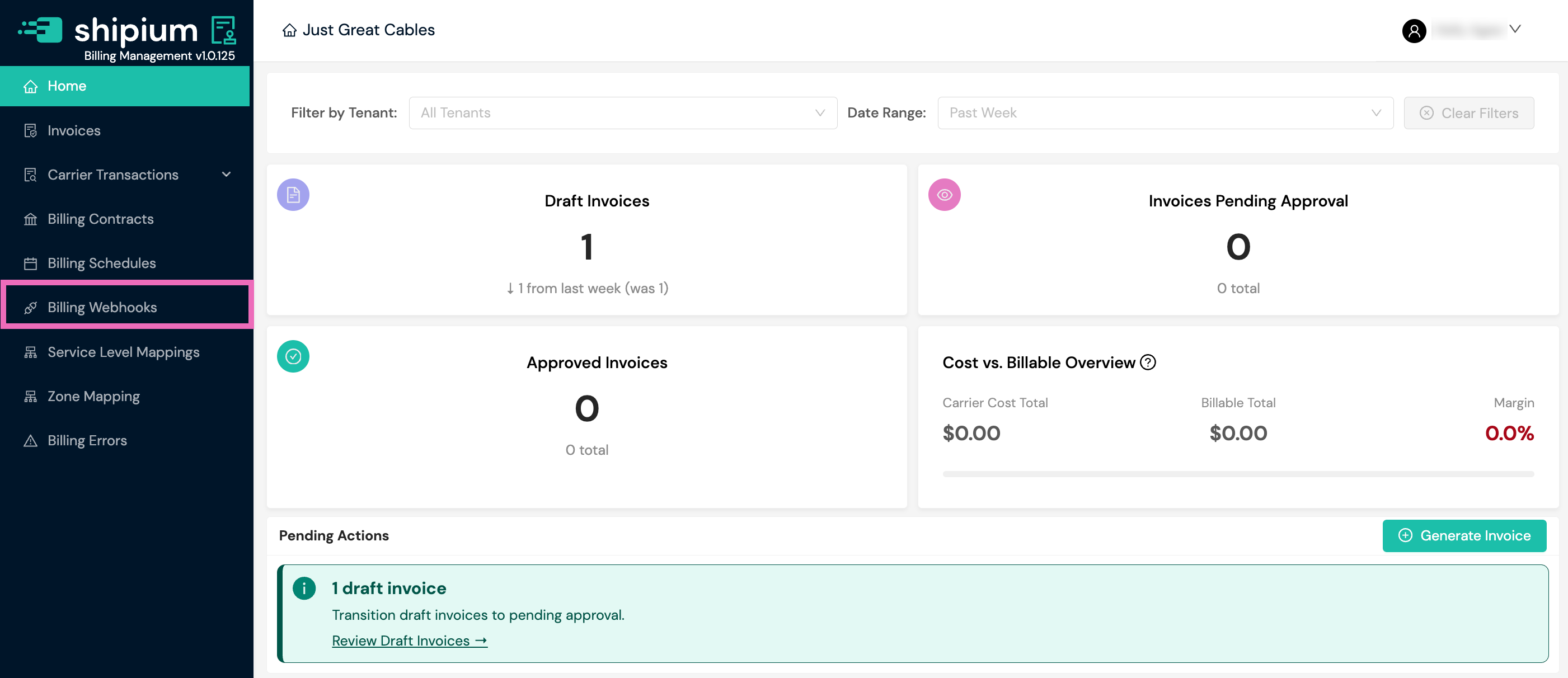
In the left navigation, select Billing Webhooks.
-
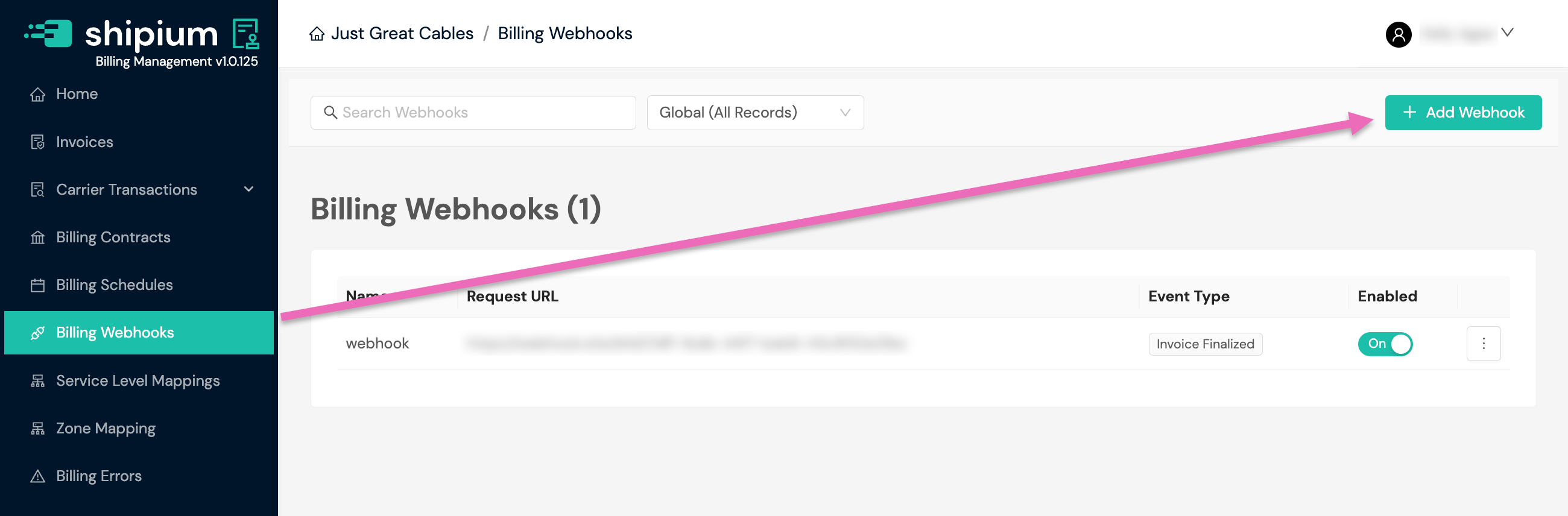
Select the Add Webhook button. Any existing webhooks your organization has previously registered will appear on this screen.
-
Complete the Settings fields:
- Name. Provide a descriptive name for your webhook.
- Payload URL. Enter the HTTPS URL where you want to receive webhook notifications. HTTP endpoints are not supported.
- Status. Shipium automatically sets new webhooks to inactive by default. This allows you to test your webhook before activating it.
- Tenants. This field only appears if your organization uses Shipium's Tenant feature. Select All to receive notifications for all tenants, or select specific tenants from the dropdown.
-
Optionally, add custom HTTP headers to your webhook. In the Headers section, select Add Additional Header and provide a key and value for each header you want to include. Headers are sent with every webhook request Shipium delivers to your endpoint.
Custom headers are commonly used to add an
Authorizationheader for HTTP Basic Authentication. For step-by-step instructions on generating and configuring custom headers, see Configure Custom HTTP Headers for Webhooks. -
Select the invoice Event Type you want to receive notifications for:
invoice_created,invoice_finalized,invoice_voided, or all three. -
Send a test payload to your endpoint to confirm successful delivery before activating your webhook.
Auto-Approve Invoices
Billing Management supports automatic invoice finalization through Auto-Approve Invoices. When it is enabled for a billing schedule, invoices generated by that schedule automatically transition to APPROVED status, which triggers the invoice_finalized webhook.
Enable Auto-Approve Invoices when you create or edit a billing schedule. The setting can be overridden for specific tenants. See Billing Schedules.
Invoice event types for your webhook
The following table includes the event metadata event types that can be returned for an invoice event notification. You can register a single webhook endpoint to receive all event types, or register separate endpoints for specific events based on your integration needs.
| Event type for webhook | Trigger | Purpose |
|---|---|---|
invoice_created | Invoice generated in DRAFT status | Notification that a new invoice is ready for review |
invoice_finalized | Invoice approved and finalized | Data delivery with presigned URL for CSV download |
invoice_voided | Invoice canceled/voided | Notification that an invoice has been canceled |
Invoice lifecycle
The following table shows when each webhook event is triggered during the invoice lifecycle.
| Invoice status | Transitions to | Webhook event trigger |
|---|---|---|
DRAFT | PENDING_APPROVAL or CANCELED | invoice_created |
PENDING_APPROVAL | APPROVED or CANCELED | (no event) |
APPROVED | CANCELED | invoice_finalized |
CANCELED | — | invoice_voided |
Webhook message structure
All billing webhooks use a standard envelope structure with metadata and payload.
{
  "metadata": { ... },
  "payload": { ... }
}| Field | Type | Required | Description |
|---|---|---|---|
metadata | Object | Yes | Event metadata for routing and idempotency |
payload | Object | Yes | Event-specific data (varies by event type) |
Event metadata
The metadata object is identical across all event types.
| Field | Type | Required | Description |
|---|---|---|---|
eventId | String (UUID) | Yes | Unique identifier for idempotency handling. Use this to prevent duplicate processing. |
eventTimestamp | String (ISO 8601) | Yes | UTC timestamp when the event was generated |
eventType | String | Yes | One of: invoice_created, invoice_finalized, invoice_voided |
partnerId | String (UUID) | Yes | Partner identifier for routing |
payloadSchemaVersion | String | Yes | Schema version (currently v1) |
testEvent | Boolean | Yes | True if this is a test event (should not be processed as real data) |
Invoice payload
The payload object contains invoice details. The following fields are included in all event types.
| Field | Type | Required | Description |
|---|---|---|---|
shipiumInvoiceId | String (UUID) | Yes | Unique Shipium invoice identifier. Use this for API calls. |
partnerInvoiceId | String | No | Partner's internal invoice reference (if assigned) |
shipiumTenantId | String (UUID) | No | Shipium tenant identifier. null for partner-level invoices. |
partnerTenantId | String | No | Partner's external tenant identifier |
invoiceNumber | String | Yes | Human-readable invoice number for display |
invoiceStatus | String | Yes | Current status: draft, finalized, or voided |
invoiceStartDate | String (ISO 8601) | Yes | Start of billing period |
invoiceEndDate | String (ISO 8601) | Yes | End of billing period |
invoiceDate | String (ISO 8601) | Yes | Date invoice was generated |
invoiceDueDate | String (ISO 8601) | Yes | Payment due date (typically invoice date + 15 days) |
currencyCode | String | Yes | ISO 4217 currency code (e.g., USD) |
invoiceTotalAmount | Number | Yes | Total invoice amount in the specified currency |
totalTransactionCount | Integer | Yes | Number of carrier transactions (shipments) in this invoice |
Invoice finalized payload fields
The invoice_finalized event includes additional fields for downloading the invoice CSV file.
| Field | Type | Required | Description |
|---|---|---|---|
presignedUrl | String (URL) | Yes | Time-limited URL to download the invoice CSV from S3 |
presignedUrlExpiresAt | String (ISO 8601) | Yes | Timestamp when the presigned URL expires |
fileHashSha256 | String | Yes | SHA-256 hash of the CSV file for integrity verification |
fileSizeBytes | Integer | Yes | Size of the CSV file in bytes |
Presigned URL details:
- Expiration. URLs expire 24 hours after generation.
- Regeneration. If the URL expires, request a new one using the regenerate presigned URL endpoint.
- Integrity. Verify the downloaded file by comparing its SHA-256 hash against
fileHashSha256.
Downloading invoice data
When an invoice is finalized, Shipium exports the invoice data to a CSV file and provides a presigned S3 URL in the webhook payload. Use this URL to download the complete invoice data, including all carrier transactions.
Downloading the CSV file. The presignedUrl field contains a time-limited URL for downloading the invoice CSV. The URL is valid until the timestamp specified in presignedUrlExpiresAt.
Verifying file integrity. After downloading the file, compare its SHA-256 hash against the fileHashSha256 value to verify the file was not corrupted during transfer.
Handling expired URLs. If the presigned URL has expired, use the regenerate presigned URL endpoint to obtain a new URL.
Webhook delivery failure. In rare cases where the S3 export fails, the invoice_finalized webhook may not be sent. If you expect an invoice to be finalized but do not receive a webhook, use the regenerate presigned URL endpoint or the CSV export endpoint as a fallback.
Invoice CSV file format
The CSV file downloaded via the presignedUrl contains one row per shipment (carrier transaction).
| Column | Header name | Data type | Description |
|---|---|---|---|
| 1 | Tenant | String | Tenant name (or partner name for partner-level invoices) |
| 2 | Invoice Generation Date | Date (YYYY-MM-DD) | Date the invoice was generated |
| 3 | Invoice ID | String (UUID) | Unique invoice identifier |
| 4 | Ship Date | Date (YYYY-MM-DD) | Date the shipment was shipped |
| 5 | Origin | String | Origin postal code |
| 6 | Currency Code | String | ISO 4217 currency code (e.g., USD) |
| 7 | Billing Cost | Decimal | Invoice cost for this shipment |
| 8 | Billable Weight | Decimal | Billable weight used for rating |
| 9 | Billable Weight Unit | String | Weight unit: LB (pounds) or KG (kilograms) |
| 10 | Tracking Number | String | Carrier tracking number |
| 11 | Carrier | String | Carrier identifier (e.g., UPS, FEDEX, DHL) |
| 12 | Carrier Zone | String | Carrier billing zone |
| 13 | Carrier Invoice Date | Date (YYYY-MM-DD) | Date from carrier's invoice |
| 14 | Service Level | String | Carrier service level (e.g., GROUND, EXPRESS) |
Example CSV content:
Tenant,Invoice Generation Date,Invoice ID,Ship Date,Origin,Currency Code,Billing Cost,Billable Weight,Billable Weight Unit,Tracking Number,Carrier,Carrier Zone,Carrier Invoice Date,Service Level
Acme Corp,2025-12-04,inv-98765432-abcd-efgh-ijkl-mnopqrstuvwx,2025-11-15,90210,USD,12.50,5.2,LB,1Z999AA10123456784,UPS,4,2025-11-20,GROUND
Acme Corp,2025-12-04,inv-98765432-abcd-efgh-ijkl-mnopqrstuvwx,2025-11-16,10001,USD,18.75,3.8,LB,1Z999AA10123456785,UPS,6,2025-11-21,EXPRESS
Acme Corp,2025-12-04,inv-98765432-abcd-efgh-ijkl-mnopqrstuvwx,2025-11-16,60601,USD,9.25,2.1,LB,794644790299,FEDEX,2,2025-11-21,GROUND
File characteristics:
- Encoding. UTF-8
- Line ending. CRLF (
\r\n) - Quoting. Fields containing commas, quotes, or newlines are quoted.
- Header row. Always included as the first row
- Sorting. Rows are not guaranteed to be in any particular order.
Partner-level vs tenant-level invoices
Tenant-level invoices
Standard invoices generated for a specific tenant within a partner account:
shipiumTenantId: Contains the tenant UUIDTenantcolumn in CSV: Contains the tenant name
Partner-level invoices
Aggregated invoices that combine all shipments across all tenants for a partner:
shipiumTenantId:nullTenantcolumn in CSV: Contains the partner name
API endpoints reference
Regenerate presigned URL
If a presigned URL has expired or you did not receive the invoice_finalized webhook, use this endpoint to generate a new presigned URL for downloading the invoice CSV.
Endpoint. POST /api/v1/billing/invoices/{invoiceId}/regenerate-presigned-url
Path parameters
| Parameter | Type | Required | Description |
|---|---|---|---|
invoiceId | String | Yes | The Shipium invoice ID |
Response (200 OK)
{
  "presignedUrl": "https://shipium-billing-management-partner-invoices.s3.us-west-2.amazonaws.com/exports/invoices/...",
  "presignedUrlExpiresAt": "2026-01-16T18:00:00Z",
  "fileHashSha256": "e3b0c44298fc1c149afbf4c8996fb92427ae41e4649b934ca495991b7852b855",
  "fileSizeBytes": 1048576
}
Error responses
| Status code | Description |
|---|---|
404 Not Found | The invoice or the export for the invoice was not found. |
400 Bad Request | The presigned URL could not be regenerated; the response body contains error details. |
Get invoice details
Returns full invoice details including line items:
Endpoint. GET /api/v1/billing/invoices/{invoiceId}
Path parameters
| Parameter | Type | Required | Description |
|---|---|---|---|
invoiceId | String | Yes | The Shipium invoice ID |
Export invoice to CSV
Alternative endpoint to download invoice data as CSV (does not require webhook):
Endpoint. GET /api/v1/billing/invoices/{invoiceId}/export-csv
Path parameters
| Parameter | Type | Required | Description |
|---|---|---|---|
invoiceId | String | Yes | The Shipium invoice ID |
Sample webhook payloads
The following examples show complete webhook messages for each event type.
Sample invoice_created payload
{
  "metadata": {
    "eventId": "evt-12345678-abcd-efgh-ijkl-mnopqrstuvwx",
    "eventTimestamp": "2025-12-04T14:30:00.000Z",
    "eventType": "invoice_created",
    "partnerId": "7b9c8d6e-5f4a-4321-b0c9-8e7f6a5b4c3d",
    "payloadSchemaVersion": "v1",
    "testEvent": false
  },
  "payload": {
    "shipiumInvoiceId": "inv-98765432-abcd-efgh-ijkl-mnopqrstuvwx",
    "partnerInvoiceId": null,
    "shipiumTenantId": "ab815bcc-950a-4902-ad8c-ac5ff6d9a438",
    "partnerTenantId": null,
    "invoiceNumber": "inv-98765432-abcd-efgh-ijkl-mnopqrstuvwx",
    "invoiceStatus": "draft",
    "invoiceStartDate": "2025-11-01T00:00:00Z",
    "invoiceEndDate": "2025-11-30T23:59:59Z",
    "invoiceDate": "2025-12-04T00:00:00Z",
    "invoiceDueDate": "2025-12-19T00:00:00Z",
    "currencyCode": "USD",
    "invoiceTotalAmount": 15847.92,
    "totalTransactionCount": 2847
  }
}
Use case. You can use this event to receive notification that a new invoice is ready for review, trigger internal workflows for invoice validation, and update dashboards with pending invoice information.
This event does not include transaction-level details. To retrieve full invoice data, use the Invoice API or wait for theinvoice_finalizedevent.
Sample invoice_finalized payload
{
  "metadata": {
    "eventId": "evt-12345678-abcd-efgh-ijkl-mnopqrstuvwx",
    "eventTimestamp": "2025-12-04T14:30:00.000Z",
    "eventType": "invoice_finalized",
    "partnerId": "7b9c8d6e-5f4a-4321-b0c9-8e7f6a5b4c3d",
    "payloadSchemaVersion": "v1",
    "testEvent": false
  },
  "payload": {
    "shipiumInvoiceId": "inv-98765432-abcd-efgh-ijkl-mnopqrstuvwx",
    "partnerInvoiceId": null,
    "shipiumTenantId": "ab815bcc-950a-4902-ad8c-ac5ff6d9a438",
    "partnerTenantId": null,
    "invoiceNumber": "inv-98765432-abcd-efgh-ijkl-mnopqrstuvwx",
    "invoiceStatus": "finalized",
    "invoiceStartDate": "2025-11-01T00:00:00Z",
    "invoiceEndDate": "2025-11-30T23:59:59Z",
    "invoiceDate": "2025-12-04T00:00:00Z",
    "invoiceDueDate": "2025-12-19T00:00:00Z",
    "currencyCode": "USD",
    "invoiceTotalAmount": 15847.92,
    "totalTransactionCount": 2847,
    "presignedUrl": "https://shipium-billing-management-partner-invoices.s3.us-west-2.amazonaws.com/exports/invoices/7b9c8d6e.../2025/12/inv-98765432.../invoice_inv-98765432..._20251204T143000Z.csv?X-Amz-Algorithm=AWS4-HMAC-SHA256&...",
    "presignedUrlExpiresAt": "2025-12-05T14:30:00Z",
    "fileHashSha256": "e3b0c44298fc1c149afbf4c8996fb92427ae41e4649b934ca495991b7852b855",
    "fileSizeBytes": 1048576
  }
}
Use case. You can use this event to download the complete invoice data for processing, trigger payment workflows in accounting systems, archive finalized invoices, and reconcile billing records.
Sample invoice_voided payload
{
  "metadata": {
    "eventId": "evt-12345678-abcd-efgh-ijkl-mnopqrstuvwx",
    "eventTimestamp": "2025-12-04T14:30:00.000Z",
    "eventType": "invoice_voided",
    "partnerId": "7b9c8d6e-5f4a-4321-b0c9-8e7f6a5b4c3d",
    "payloadSchemaVersion": "v1",
    "testEvent": false
  },
  "payload": {
    "shipiumInvoiceId": "inv-98765432-abcd-efgh-ijkl-mnopqrstuvwx",
    "partnerInvoiceId": null,
    "shipiumTenantId": "ab815bcc-950a-4902-ad8c-ac5ff6d9a438",
    "partnerTenantId": null,
    "invoiceNumber": "inv-98765432-abcd-efgh-ijkl-mnopqrstuvwx",
    "invoiceStatus": "voided",
    "invoiceStartDate": "2025-11-01T00:00:00Z",
    "invoiceEndDate": "2025-11-30T23:59:59Z",
    "invoiceDate": "2025-12-04T00:00:00Z",
    "invoiceDueDate": "2025-12-19T00:00:00Z",
    "currencyCode": "USD",
    "invoiceTotalAmount": 15847.92,
    "totalTransactionCount": 2847
  }
}
Use case. You can use this event to cancel pending payments for this invoice, update accounting systems to exclude the voided invoice, and maintain an audit trail of cancelled invoices.
Final steps and sample webhook call content
This section provides instructions for responding successfully to your webhook's initial call as well as information about Shipium's retry behavior.
How to respond to your webhook call
Upon receipt of a webhook call, respond with an appropriate HTTP status code to acknowledge successful receipt. Your response must be an HTTP status code within the 200-299 range.
Example response:
HTTP/1.1 200 OK
Content-Type: application/json

{"status": "received"}
Webhook retry logic
If a webhook delivery fails, the Shipium platform employs automated retry logic.
Retry policy:
- Initial attempt. Immediate
- Retry on failure. 1 retry after a brief delay
- Timeout. Webhooks should respond within 30 seconds.
Billing Management webhooks use a different retry policy than Carrier Selection and Tracking webhooks. If your integration spans multiple webhook types, refer to each webhook page for its specific retry behavior.
Failure handling. If webhook delivery fails after the retry, the event is logged but not requeued. Partners can use the Invoice API or the CSV export endpoint to retrieve invoice data.
Idempotency
Use the eventId field in the metadata to handle duplicate deliveries. Your system should track received event IDs and skip processing for events you have already handled.
def handle_webhook(event):
    event_id = event['metadata']['eventId']

    if already_processed(event_id):
        return {"status": "already_processed"}

    # Process the event
    process_event(event)

    # Mark as processed
    mark_processed(event_id)
    return {"status": "success"}
Test events
Filter out test events in production by checking the testEvent field in the metadata.
def handle_webhook(event):
    if event['metadata']['testEvent']:
        log.info("Ignoring test event")
        return {"status": "ignored_test_event"}

    # Process real event
    ...
File integrity verification
Verify downloaded CSV files using SHA-256 to ensure the file was not corrupted during transfer.
import hashlib

def verify_file(file_path, expected_hash):
    sha256 = hashlib.sha256()
    with open(file_path, 'rb') as f:
        for chunk in iter(lambda: f.read(8192), b''):
            sha256.update(chunk)
    return sha256.hexdigest() == expected_hash
Status mapping reference
The following table shows how internal invoice statuses map to webhook event types.
| Internal status | Webhook status | Event type |
|---|---|---|
DRAFT | draft | invoice_created |
PENDING_APPROVAL | pending | (no event) |
APPROVED | finalized | invoice_finalized |
CANCELED | voided | invoice_voided |
Troubleshooting
Webhook not receiving events
- Confirm with your Shipium representative that your webhook is active.
- Check that your endpoint URL is correct and accessible from the internet.
- Ensure your endpoint responds within the 30-second timeout.
- Verify firewall rules allow incoming requests from Shipium's infrastructure.
Duplicate events received
- Implement idempotency handling using the
eventIdfield. - Check if your endpoint is returning non-2xx responses, which triggers retries.
Presigned URL expired
Use the POST /api/v1/billing/invoices/{invoiceId}/regenerate-presigned-url endpoint to generate a new URL. URLs expire 24 hours after generation.
File hash mismatch after download
The file may have been corrupted during transfer. Re-download the file using the presigned URL or regenerate a new URL if it has expired. If the issue persists, contact Shipium Support.
Did not receive invoice_finalized webhook
In rare cases, the webhook may not be sent if the S3 export fails. Use the regenerate presigned URL endpoint or the CSV export endpoint (GET /api/v1/billing/invoices/{invoiceId}/export-csv) to retrieve the invoice data.
Missing tenant information
- The
shipiumTenantIdandpartnerTenantIdfields are present for tenant-level invoices. - Partner-level invoices have
nullvalues for these fields.
Related documentation
- Shipium Webhooks
- Configure Custom HTTP Headers for Webhooks
- Webhooks for Carrier Selection & Label Updates
- Webhooks for Tracking
- Webhooks for Pack App Order Lifecycle
Resources
Your Shipium team member is available to help along the way. However, you might find these resources helpful:
Updated 2 months ago