
OnTrac
Ensure you have provided credentials to ship with OnTrac.
OnTrac requirements
To ship using OnTrac service methods, you'll first need to configure your account in the Shipium Console. Instructions for doing so are included in this document. OnTrac is in the process of migrating customers from its legacy SOAP API to a new REST API. Shipium supports both APIs and is coordinating this migration with each partner individually. As a result, the Shipium Console accepts both sets of OnTrac credentials, and you'll see additional optional fields when configuring your account. Your Shipium team member will let you know when it's time to add your REST API credentials.
LaserShip and OnTrac mergerIn 2021, LaserShip and OnTrac merged into a single company, keeping the OnTrac name. LaserShip Routed Delivery is still available to existing customers as a separate service method. You can find guidance for that service method in the LaserShip documentation.
Configure your OnTrac account with Shipium
To set up an OnTrac account in Shipium, you'll create the carrier account in the Shipium Console and provide the credentials issued to you by OnTrac.
Create an OnTrac carrier account
To begin, navigate to Configure > Fulfillment Contexts and select the fulfillment context where you want to add OnTrac. Go to the Carrier Contracts tab and select Add Contract. Choose OnTrac as the carrier and provide a contract name.
Note: You can also create and manage carrier accounts independently via Configure > Fulfillment Configuration. The Fulfillment Context workflow is suggested; however, you can find more information about the Fulfillment Configuration workflow in Configure | Fulfillment Configuration.
The workflow will guide you through contract details, carrier settings, carrier account, and carrier rates. You can find guidance for other steps in the Carrier Contracts documentation. This step provides instructions for creating the carrier account. You'll provide the following:
- Carrier Account Name. Required. A name to represent this carrier account configuration
- Description. Optional. A description your organization will use to refer to the account
- Cost Center. Optional. A field you can send to carriers in API calls, when supported
- International Shipping. Optional. A dropdown selection for domestic or international shipping for the account; the default is No.
- Return To Address. Optional. The address where undeliverable packages will be returned
- Return To Contact. Optional. The point of contact for return shipments
- OnTrac Account Number. Required. Your OnTrac account number
- OnTrac Web Password. Required. The web password issued to you by OnTrac
- OnTrac Web Service ID. Optional. The Web Service ID issued to you by OnTrac for REST API access
- OnTrac Web Service Secret. Optional. The Web Service Secret issued to you by OnTrac for REST API access
- OnTrac Customer Branch. Optional. The alphanumeric Customer Branch identifier issued to you by OnTrac, specific to the warehouse for this carrier account
- OnTrac Web Service ID Test. Optional. The Web Service ID used for OnTrac REST API access in test mode
- OnTrac Web Service Secret Test. Optional. The Web Service Secret used for OnTrac REST API access in test mode
- OnTrac Customer Branch Test. Optional. The Customer Branch identifier used for OnTrac REST API access in test mode
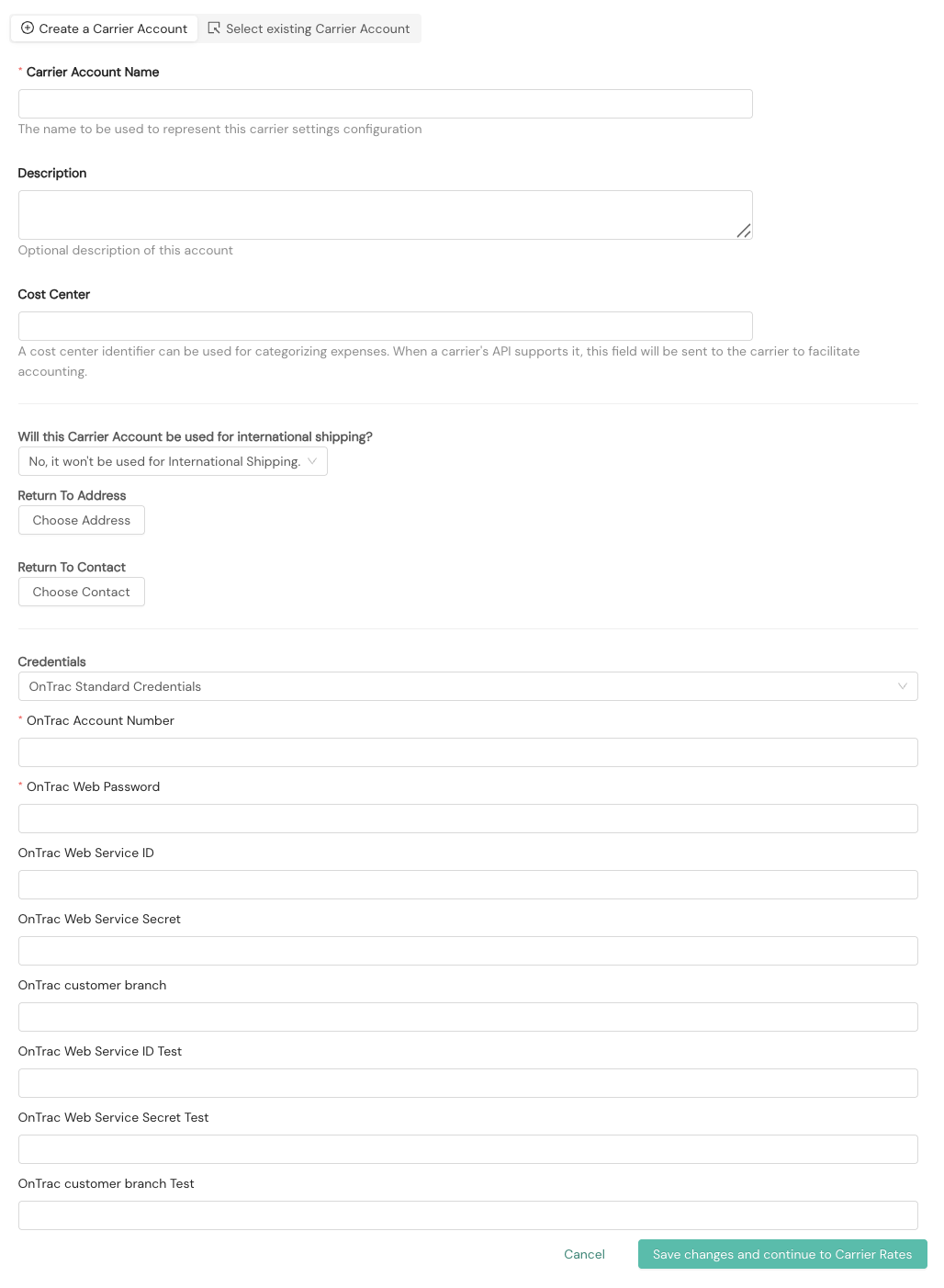
Note: The OnTrac Web Service ID, Web Service Secret, and Customer Branch fields are required only after Shipium has coordinated your migration to OnTrac's REST API.
OnTrac account credentials
OnTrac issues credentials directly to your organization. If you don't yet have OnTrac REST API credentials (Web Service ID, Web Service Secret, and Customer Branch), contact your OnTrac account representative to request them. The Customer Branch identifier is specific to each warehouse, so partners with multiple fulfillment centers will receive a separate Customer Branch per warehouse.
OnTrac service methods
The OnTrac service methods supported by Shipium are listed in the Supported Carriers documentation.
FAQ
Q: What if I don't already have an OnTrac account?
A: You can create a new OnTrac account by contacting OnTrac directly. Once you have an OnTrac account and credentials, you can follow the guidance in this document.
Q: Does Shipium hold a copy of our credentials once entered?
A: Your credentials are stored securely in the Shipium platform and used only to authenticate API calls to OnTrac on your behalf.
Q: What if I don't know my OnTrac credentials?
A: Shipium recommends contacting your OnTrac account representative to request your credentials.
Q: What's the difference between the OnTrac Web Password and the OnTrac Web Service Secret?
A: The OnTrac Web Password authenticates calls to OnTrac's legacy SOAP API. The OnTrac Web Service Secret, paired with the Web Service ID and Customer Branch, authenticates calls to OnTrac's REST API. Both sets of credentials may appear in the Console during the period in which Shipium is migrating partners to OnTrac's REST API.
Q: What happens when I void an OnTrac label?
A: Voiding an OnTrac label cancels the shipment with OnTrac and returns a status indicating success or failure. Label voiding is available for accounts configured to use OnTrac's REST API, and void requests are sent to OnTrac directly. Because a void can return a failure response, make sure your integration handles void failures appropriately.
Resources
Your Shipium team member is available to help along the way. However, you might find these resources helpful:
Updated 3 months ago