
Orca AI Agent Tips & Best Practices
Best practices and tips
The suggestions below come from internal and external users. If you've discovered something that works well, please share it with your Shipium contact or email [email protected].
General best practices and tips
Include all question components
The Sample Orca AI Agent Questions and Examples page includes a table explaining the most critical elements of effective Orca AI Agent queries: metric visualization, data to be used, data breakdown, and filters. Most successful requests include all four.
Make small adjustments and try again
If your first attempt doesn't return what you expected, copy your original query and make small changes to get closer to your goal. It often takes a few tries to get exactly what you want.
Be more specific
If you try i would like a bar chart of costs for the last 4 weeks and get back a single bar instead of one per week, add more detail. For example, i would like a bar chart of costs for the last 4 weeks with one bar per week removes any ambiguity about how the data should be grouped.
Tell Orca what you were trying to do
If the Orca AI Agent returns something close but not quite right, you can ask it to adjust. For example, if it showed a bar chart but you wanted a column chart, you can type close, but I wanted a columnar chart and Orca will usually make the correction. In some cases, you may need to start fresh with a new request.
Creating data visualizations
Ensure all question components are included
The Sample Orca AI Agent Questions and Examples page includes a table explaining the most critical elements of most successful Orca AI Agent queries.
Review the explanation Orca AI Agent returns
Below each request you submit, the Orca AI Agent displays a summary of how it interpreted your query. This summary can help you understand what went wrong if the results aren't what you expected.
When reviewing, consider:
- Did Orca interpret your chart type correctly?
- Did it understand the filter you applied?
- Did it include or exclude information you didn't intend?
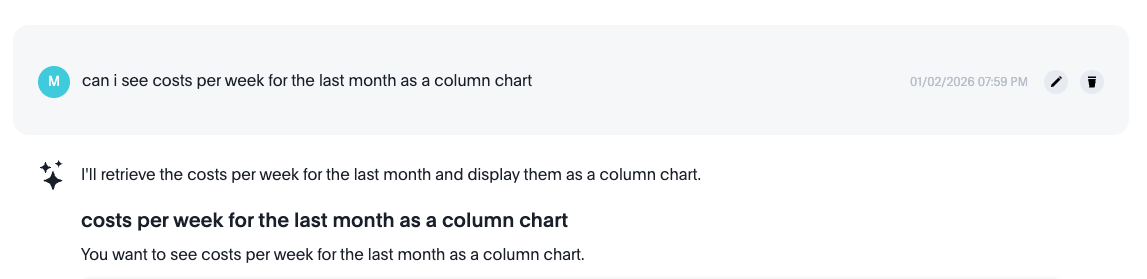
Sample chat interface summary
Running data analyses
Review, verify, and validate
The Orca AI Agent does a great job of analyzing your data, but it's not a person. Sometimes your question has context that's difficult to express, or you're looking for something very specific. In these cases, the analysis may be technically correct but not actually answer the question you had in mind — especially for broad or open-ended questions.
You should always review the information returned, verify that it answers the question you intended to ask, and validate that the analysis is relevant to what you were trying to accomplish. Orca performs better with specific questions and may take an unexpected direction if the question is too broad.
Updated 9 months ago